Macbook Pro 2011 GPU Repair
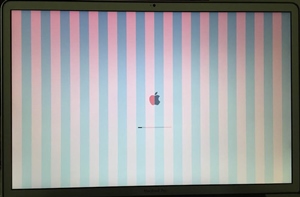
MacBook Pro 2011 GPU repair is one of the most common jobs I do on this generation of MacBook. If you’re reading this, you’re probably dealing with a MacBook Pro graphics card fault — vertical or horizontal lines on the screen, a black screen, or sudden shutdowns on a 15-inch or 17-inch model from 2011–2012. In almost every case, the cause is the same: a failing discrete GPU.
These MacBook Pro models — A1286 (15″) and A1297 (17″) — are known for a fault that shows up sooner or later in the discrete graphics: the GPU itself, the video memory (VRAM), or the connections between them inside the board, which cannot be restored. Symptoms usually follow a familiar pattern.
MacBook Pro 2011–2012 GPU Failure Symptoms
- Lines on the MacBook screen — vertical or horizontal, in colour or grey.
- The MacBook Pro 2011-2012 won’t turn on, or shuts down suddenly for no clear reason.
- The MacBook gets stuck or shows a white screen while loading macOS.
- Graphic artifacts appear during normal use or right at startup.
- The screen stays black even though the MacBook is clearly running.
- Sudden restarts with the message “Your computer restarted because of a problem.”
- Restarts caused by a kernel panic or a GPU panic.
- The MacBook restarts partway through loading the operating system.
Apple ran a repair extension program for this exact fault years ago, replacing the whole logic board — but that program ended a long time ago, and even a replaced board often developed the same GPU failure again later. Today these models are listed by Apple as obsolete: the official service no longer works on them and no longer stocks parts for them.
Why There’s Only One Real Fix Today
Years ago I could replace the faulty GPU chip itself, or the video memory chips. That’s no longer a practical option — new chips for this generation simply aren’t being made anymore, so chip-level replacement isn’t something I offer today.
What I do instead is disable the discrete GPU electronically and set the MacBook to run only on the graphics built into the main Intel processor. This is a permanent fix: the integrated GPU essentially never fails on its own, so once it’s done, this particular fault doesn’t come back. No NVRAM or PRAM reset undoes it.
How I Do MacBook Pro 2011 GPU Repair
- Diagnosis. I confirm the fault is the discrete GPU and check the board for any visible corrosion.
- Disabling the discrete GPU. I move the MacBook fully to the integrated Intel graphics only.
- Ultrasonic cleaning — if needed. I do it when there are oxides or traces of corrosion on the board.
- Testing. I stress-test the graphics under load to confirm the artifacts, lines, or restarts are gone for good.
If there is visible corrosion on the board, or the board is simply dirty, it can be washed in the ultrasonic bath. That is a separate service, not part of the repair by default. But to be honest with you, computers this old almost always need a wash to get the oxides off.
Worth Repairing, or Time to Replace?
These MacBooks stopped getting macOS updates a long time ago. For the 2011 models the ceiling is High Sierra 10.13.6; the mid-2012 MacBook Pro went a little further and officially supports Mojave and Catalina. Browsers tell a similar story: current versions of Chrome no longer come out for High Sierra, and Firefox installs only as the separate ESR 115 branch, which Mozilla has committed to patch for security until March 2027.
So this isn’t the machine for everyday browsing anymore. Where it still makes sense is if you depend on an older program that only runs on this exact setup, or you use it offline for something specific — documents, media, a legacy application you already have installed. In that case, there’s little reason to throw out a working computer over one graphics chip. The repair costs around 400 shekels and it is a permanent fix. If deeper work on the board is needed at the same time, I do it in the same visit — more on the logic board repair page.
Bring your MacBook in for a free diagnosis and I’ll confirm what’s wrong and what it costs before any work begins. Have questions first? Message me on WhatsApp or contact me — or browse my other MacBook repair services.
I install new firmware and disable the GPU, so the macbook will use only one integrated GPU that almost never breaks down. It cost about 400 NIS not including VAT
Hi,
Interested in disabling the GPU on MacBook pro 2011. Can you please provide the details of what you do and how much is it?
Thanks,
Vlad