MacBook Touch Bar Repair
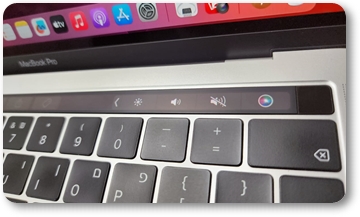
MacBook Touch Bar repair is one of the core services at my lab. Has the Touch Bar on your MacBook Pro stopped working, frozen or started behaving strangely? It’s one of the most delicate parts of a MacBook: the touch strip is directly connected to the logic board, so the fault can be either in the strip itself or in the board’s circuits. At the RepairPC lab the repair is done at component level, and the strip is replaced on its own — without swapping the whole Top Case.
Bring it in for free diagnostics: the cause is identified precisely and the price is given before any work begins.
Why choose me for MacBook Touch Bar repair
- Touch Bar replacement as a separate part: you pay for the strip, not for the whole top panel with keyboard and battery.
- Repairing the Touch Bar circuits on the logic board and recovery after liquid damage — work few shops take on.
- Original strips only.
- Your MacBook is not sent to subcontractors: diagnostics, repair and testing all happen at my lab.
- Free diagnostics, an exact price before the work, and a warranty on the repair.
Replacing the Touch Bar instead of the whole top panel
Here’s the key difference. On every MacBook Pro model the Touch Bar strip isn’t a removable part — it’s glued into the Top Case, the upper panel with the keyboard, trackpad, speakers and battery. That is why most shops offer to replace the entire Top Case when the strip fails, and that is very expensive. An authorised service centre doesn’t even offer an alternative: they are required to replace the Top Case as an assembly for any Touch Bar fault, because to Apple it is one inseparable part.
I have the technique for peeling off and re-gluing the strip, so Touch Bar replacement is done as a separate part on any model. MacBook Touch Bar repair costs far less than replacing the entire top panel.
Replacing the whole Top Case is possible too — if you want to, or if the keyboard and battery are also in poor shape and worth renewing at the same time. It’s all by arrangement, with the price agreed upfront.
Signs of a Touch Bar fault
Symptoms vary widely. Clients most often come in with a Touch Bar not working in one of these ways:
- The strip doesn’t react to touch, or reacts only partially.
- The Touch Bar is dark, even though the MacBook powers on and works.
- The strip flickers, shows lines or uneven backlight.
- The Touch Bar registers taps on its own, causing errors.
- The strip glows too faintly or won’t turn off when it should.
- Volume, brightness, Esc or Touch ID on the strip don’t respond.
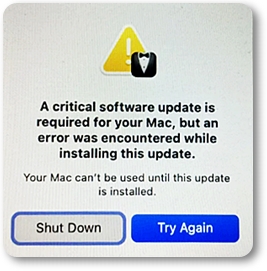
- On startup a window appears — “A critical software update is required for your Mac” — and the computer won’t go any further.
- The Touch Bar stopped working after liquid was spilled on the MacBook.
Any of these is a reason to book a MacBook Pro Touch Bar repair: the sooner the fault is found, the more likely the strip can be saved instead of the whole Top Case being replaced.
The critical software update MacBook error: why the Mac won’t boot
This is one of the most deceptive faults. On startup the MacBook shows an error window: “A critical software update is required for your Mac, but an error was encountered while installing this update. Your Mac can’t be used until this update is installed” — offering only Shut Down or Try Again.
The reason is that the system tries to update the Touch Bar firmware and can’t, because the strip itself is faulty. As a result macOS won’t boot at all until the problem is fixed.
The critical software update MacBook error almost always means a hardware fault in the strip rather than a software glitch — reinstalling macOS does not help here. If you are seeing this message, bring the MacBook in: once the strip is working again, so is the system.
Why the Touch Bar fails
Diagnostics show the exact cause. But it’s usually one of three:
- Liquid ingress. A spilled drink causes corrosion on the Touch Bar cable and in the logic board circuits. The sooner you bring it in, the better the chance of a repair.
- Mechanical damage. A knock, a bent chassis or a damaged cable is a common reason the strip goes dark or works intermittently.
- Board circuit fault. The Touch Bar draws power from the logic board circuits and is driven by a dedicated controller: it is an additional OLED display with its own system, working alongside the main screen and the computer. If the power circuits or the controller have failed, Touch Bar replacement changes nothing — the board needs component-level repair.
Touch Bar not working: what you can try yourself
Sometimes the problem turns out to be software-related, and a simple reset fixes it. Before bringing the MacBook in, try resetting NVRAM and the SMC — it’s safe and takes a couple of minutes:
- NVRAM (PRAM) reset: shut down the MacBook, turn it on and immediately hold Option + Command + P + R for about 15 seconds until the computer restarts. Full instructions are on the Apple Support site.
- SMC reset: on Intel models with a Touch Bar (A1706, A1989, A2159, A2251, A2289, A1707, A1990, A2141) shut down the MacBook, hold Control + Option + Shift for 7 seconds, then add the power button and hold for another 7 seconds, release and start the computer.
- Update macOS: make sure the system is up to date — Apple periodically fixes bugs affecting the Touch Bar.
Important: the MacBook Pro A2338 (M1 and M2) has no SMC or NVRAM reset — on Apple processors these parameters reset automatically during a normal restart, and there is no separate key combination.
A Touch Bar not working after all of this is a hardware fault — in the strip itself, the cable or the logic board circuits. Bring the MacBook in for free diagnostics: MacBook Pro Touch Bar repair always starts there.
How MacBook Touch Bar repair works
- Diagnostics. It is established where the fault sits — in the strip, in the cable or in the logic board circuits.
- Board repair. The Touch Bar power and control circuits are restored; where liquid has caused corrosion, the board is cleaned and the damaged components are replaced.
- Touch Bar replacement. If the fault is in the strip itself, only the Touch Bar is replaced with a new one, without swapping the whole Top Case.
- Top Case replacement — optional. If you want to renew the whole top panel, or the keyboard and battery are also worn, the Top Case is replaced as an assembly. By arrangement, with the price agreed upfront.
No work and no extra charges without your approval: after diagnostics I show you all the options, and the decision is yours.
MacBook Pro models with a Touch Bar
MacBook Pro Touch Bar repair is done on every model that has one:
- 13-inch: A1706, A1989, A2159, A2251, A2289, A2338.
- 15-inch: A1707, A1990.
- 16-inch: A2141.
Note: the A1708 (13-inch) is the only model of this generation without a Touch Bar — it has regular function keys instead. Not sure which model you have? The number is on the bottom case next to the Apple logo — or just message me and I’ll help you identify it.
Need MacBook Touch Bar repair? Get in touch, write on WhatsApp or call 054-225-7705 — bring it in for free diagnostics.